Sandbox

  • 开发者
  • 帮助
  • Contact
Teamwork

如何使用 TronLink App 进行转账/收款?

  • 2025-01-15
  • By
  • 3 Comments
  • 3 Likes

Transfer Assets

1. Open TronLink App and tab “Transfer” on the homepage;
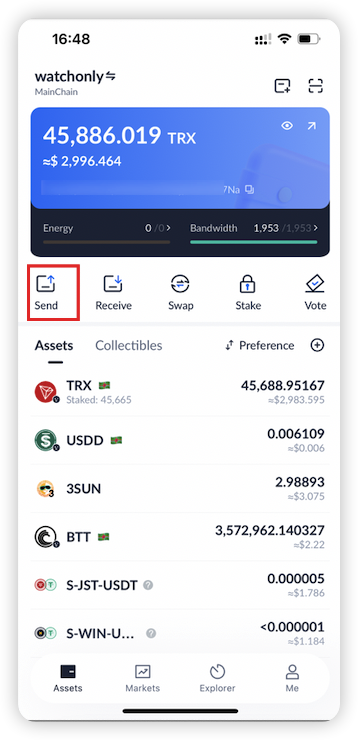
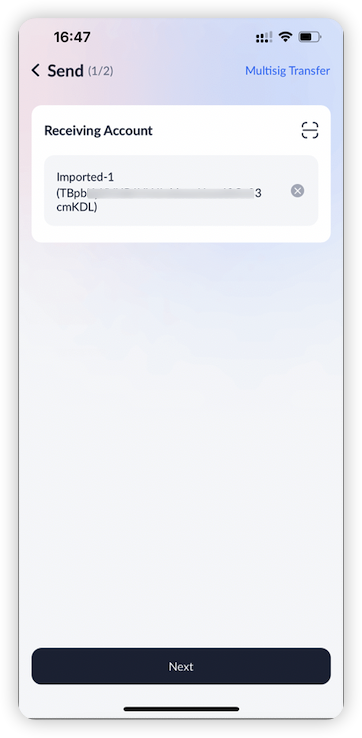
 2. Enter the receiving account;

Note: If the receiving account is not active, a certain amount of TRX will be consumed to activate the account.
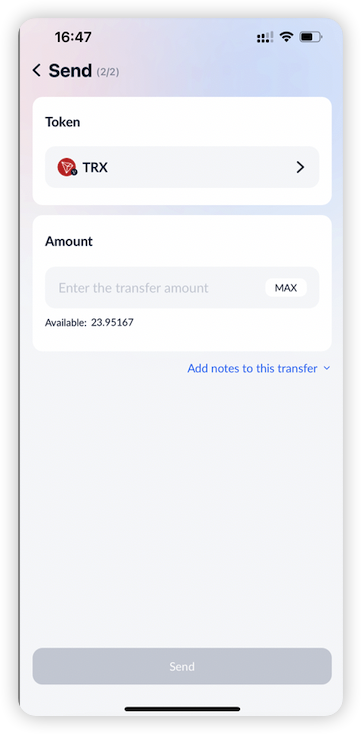
 3. Choose the token that you would like to transfer and enter the amount
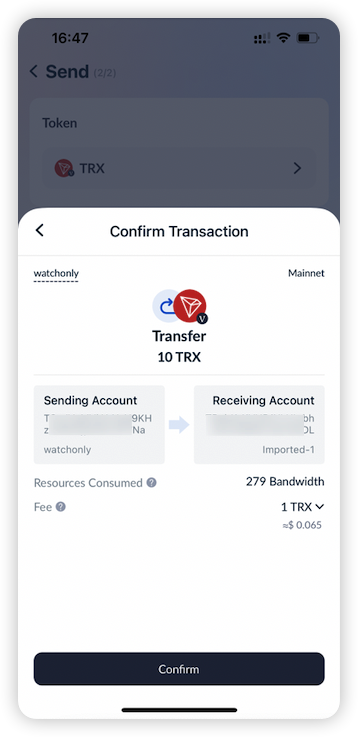
4. Confirm the transaction information and sign.

  • If you are using a cold wallet, you need to confirm in the cold-wallet device.
  • If you are using a Ledger, you need to confirm in the Ledger.
Receive Assets

  1. Open TronLink App and tab “Receive” on the homepage to enter the receiving page. Copy your current account address, or share the address QR code to the sender, who will scan the QR code to transfer assets to your account.
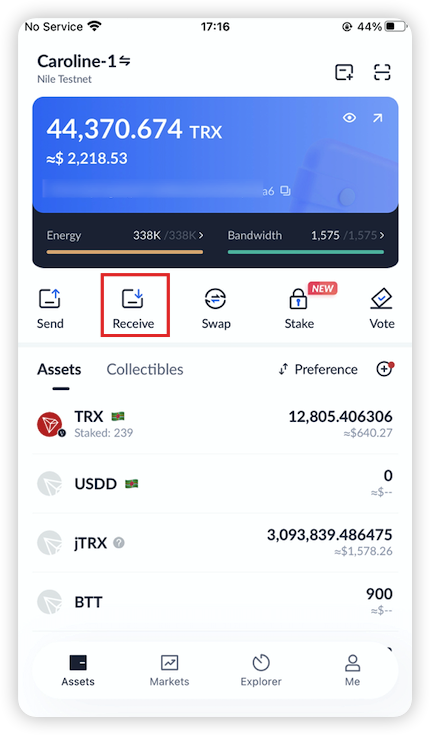
Note: Transferring assets will consume Energy or Bandwidth as fee and will burn TRX if your Energy or Bandwidth is insufficient. For more information on how to obtain Energy or Bandwidth, please refer to the tutorial on staking.

Twitter Facebook Linkedin


Would you like to share your thoughts?

Your email address will not be published. Required fields are marked *

About Us

TRON 社区由全球开发者、内容创作者、节点运营者、投资者及普通用户组成,是一个开放、活跃且多元的生态系统。社区成员共同推动 TRON 网络的技术进步、DApp 生态发展与去中心化理念的传播.

相关文章

  • 如何发送/接收收藏品?
  • 如何使用多重签名转账?
  • 如何使用 Ledger 转账?
  • GasFree 钱包使用文档

分类

  • App 钱包指南 (1)
  • DApp 相关 (2)
  • TronLink 集成 (4)
  • 公告中心 (5)
  • 关于TronLink (5)
  • 安全知识 (6)
  • 帮助中心 (2)
  • 常见问题 (7)
  • 开发文档 (10)
  • 开发者 (0)
  • 插件钱包指南 (8)
  • 新手引导 (11)
  • 未分類 (7)
  • 质押 & 投票 (9)
  • 资产管理 (4)
  • 转账教程 (5)
  • 钱包管理 (18)

归档

  • 2026 年 6 月 (1)
  • 2026 年 1 月 (5)
  • 2025 年 6 月 (17)
  • 2025 年 5 月 (4)
  • 2025 年 3 月 (3)
  • 2025 年 2 月 (5)
  • 2025 年 1 月 (17)
  • 2024 年 12 月 (10)
  • 2024 年 11 月 (1)
  • 2024 年 10 月 (1)
  • 2024 年 7 月 (1)
  • 2024 年 6 月 (1)
  • 2024 年 5 月 (1)
  • 2024 年 4 月 (1)
  • 2024 年 2 月 (3)
  • 2024 年 1 月 (1)
  • 2023 年 4 月 (1)
  • 2023 年 2 月 (3)
  • 2023 年 1 月 (1)
  • 2022 年 10 月 (1)
  • 2022 年 2 月 (1)
  • 2021 年 10 月 (1)
  • 2021 年 9 月 (1)
  • 2021 年 2 月 (10)
  • 2020 年 7 月 (2)
  • 2020 年 6 月 (1)
  • 2020 年 2 月 (7)

订阅我们的时事通讯

订阅我们的新闻通讯,即可收到我们的新闻资讯和优惠信息。请放心,我们讨厌垃圾邮件,并尊重您的隐私。

加入社区

让我们携手共创辉煌。我们深受 5000 多家客户的信赖。加入我们,使用我们的服务,拓展您的业务。

Join Us

需要帮助?

  • App 钱包指南 (1)
  • DApp 相关 (2)
  • TronLink 集成 (4)
  • 公告中心 (5)
  • 关于TronLink (5)
  • 安全知识 (6)
  • 帮助中心 (2)
  • 常见问题 (7)
  • 开发文档 (10)
  • 开发者 (0)
  • 插件钱包指南 (8)
  • 新手引导 (11)
  • 未分類 (7)
  • 质押 & 投票 (9)
  • 资产管理 (4)
  • 转账教程 (5)
  • 钱包管理 (18)

了解更多

  • About Us
  • 繁体中文
  • 英文
  • 日本

联系我们

4482 Ella Street. Oakland, California, US
info@tronlink.info
+1 650-290-8767

© Tronlink. All rights reserved.